Introduction to the xcube EOPF Data Store
Learn how to build analysis-ready data cubes from multiple EOPF Zarr samples.

Table of Contents
Run this notebook interactively with all dependencies pre-installed
Introduction
xcube-eopf is a Python package that extends xcube with a new data store called "eopf-zarr". This plugin enables the creation of analysis-ready data cubes (ARDC) from multiple Sentinel products published by the EOPF Sentinel Zarr Sample Service.
This notebook provides an introduction to the xcube EOPF data store, demonstrating its main features and showing initial usage examples. Separate notebooks are available for each EOPF Zarr product collection, showcasing how to access the data and the Sentinel mission specific features used to generate analysis-ready data cubes (ARDCs).
🐙 GitHub: EOPF Sample Service – xcube-eopf
❗ Issue Tracker: Submit or view issues
📘 Documentation: xarray-eopf Docs
Install the xcube EOPF Data Store
The xcube EOPF Data Store can be installed using either pip or conda/mamba from the conda-forge channel.
📦 PyPI: xcube-eopf on PyPI
pip install xcube-eopf🐍 Conda (conda-forge): xcube-eopf on Anaconda
conda install -c conda-forge xcube-eopf
You can also use Mamba as a faster alternative to Conda: mamba install -c conda-forge xcube-eopf
Introduction to xcube
xcube is an open-source Python toolkit for transforming Earth Observation (EO) data into analysis-ready datacubes following CF conventions. It enables efficient data access, processing, publication, and interactive exploration.
Key components of xcube include:
xcube data stores – efficient access to EO datasets
xcube data processing – creation of self-contained analysis-ready datacubes
xcube Server – RESTful APIs for managing and serving data cubes
xcube Viewer – a web app for visualizing and exploring data cubes
Data Stores
Data stores are implemented as plugins. Once installed, it registers automatically and can be accessed via xcube’s new_data_store() method. The most important operations of a data store instance store are:
store.list_data_ids()- List available data sources.store.has_data(data_id)- Check data source availability.store.get_open_data_params_schema(data_id)- View available open parameters for each data source.store.open_data(data_id, **open_params)- Open a given dataset and return, e.g., an xarray.Dataset instance.
To explore all available functions, see the Python API.
Main Features of the xcube-eopf Data Store
The xcube-eopf plugin uses the xarray EOPF backend to access individual EOPF Zarr samples, then leverages xcube’s data processing capabilities to generate a 3D analysis-ready datacube (ARDCs) from multiple samples.
The workflow for building datacubes from multiple EOPF products involves the following steps, which are implemented in the open_data() method:
Query products using the EOPF STAC API for a given time range and spatial extent.
Retrieve observations as cloud-optimized Zarr chunks via the xarray-eopf backend (Webinar 3).
Mosaic spatial tiles into single images per timestamp.
Stack the mosaicked scenes along the temporal axis to form a 3D cube.
📚 More info: xcube-eopf Documentation
Import Modules
The xcube-eopf data store is provided as a plugin for xcube. Once installed, it registers automatically, allowing you to import xcube just like any other xcube data store:
import datetime
from xcube.core.store import new_data_store
Data Store Bascis
The following section introduces the basic functionality of an xcube data store. It helps you navigate the store and identify the appropriate parameters for opening datacubes.
To initialize an eopf-zarr data store, execute the cell below:
store = new_data_store("eopf-zarr")The data IDs point to STAC collections. In the following cell we can list the available data IDs.
store.list_data_ids()['sentinel-2-l1c',
'sentinel-2-l2a',
'sentinel-3-olci-l1-efr',
'sentinel-3-olci-l2-lfr',
'sentinel-3-slstr-l1-rbt',
'sentinel-3-slstr-l2-lst']One can also check if a data ID is available via the has_data() method, as shown below:
store.has_data("sentinel-2-l2a")TrueThe Sentinel-5P products are not part of the EOPF Zarr Sample Service, so the following cell returns False:
store.has_data("sentinel-5p-l1-ra-bd1-nrti")FalseBelow, you can view the parameters for the open_data() method for each supported data product. The following cell generates a JSON schema that lists all opening parameters for each supported Sentinel product.
store.get_open_data_params_schema()This function also shows opening parameters for a specific data_id, as shown below.
store.get_open_data_params_schema(data_id="sentinel-2-l2a")Generating a Data Cube from multiple Samples
We now generate a data cube from the Sentinel-2 L2A product by setting data_id to "sentinel-2-l2a". The bounding box is defined to cover the Hamburg area, and the time range is set to the last 15 days. Here, the query parameter is used to select tiles with less than 40% cloud cover, improving the chances of a clear plot. The data cube is requested in the WGS84 (EPSG:4326) projection.
ds = store.open_data(
    data_id="sentinel-2-l2a",
    bbox=[9.85, 53.5, 10.05, 53.6],
    time_range=[str(datetime.date.today() - datetime.timedelta(days=15)), None],
    query={"eo:cloud_cover": {"lt": 40}},
    spatial_res=10 / 111320,  # meters converted to degrees (approx.)
    crs="EPSG:4326",
    variables=["b02", "b03", "b04", "scl"],
)
dsNote that the 3D datacube generation is fully lazy. The actual data download and processing (e.g. mosaicking, stacking) are performed on demand and only triggered when the data is written or visualized. As an example, we plot a single timestamp in the next cell.
ds.b04.isel(time=0).plot(vmin=0, vmax=0.2)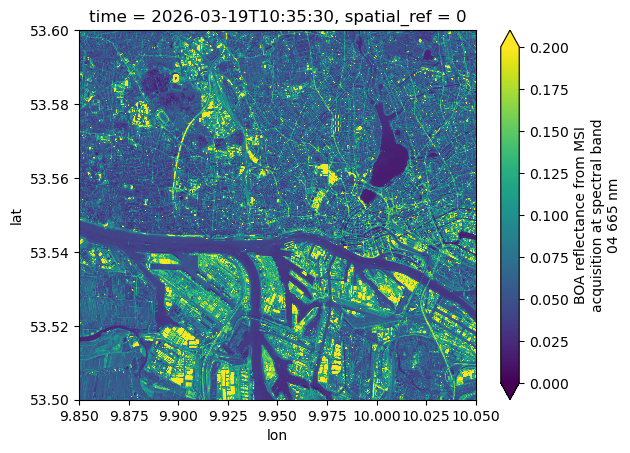
Conclusion
This notebook highlighted the main features of the xcube EOPF Data Store, which enables seamless access to multiple EOPF Zarr products as analysis-ready data cubes (ARDCs). Key takeaways:
3D spatio-temporal analysis-ready data cubes can be generated from multiple EOPF Sentinel Zarr samples.
The cube generation workflow follows this pattern:
Query via the EOPF STAC API
Read using the xarray-eopf backend (Webinar 3)
Mosaic along spatial dimensions
Stack along the temporal dimension
Further Examples
For additional use cases, see the notebooks for Sentinel-2 and Sentinel-3 EOPF Zarr products.
