xarray EOPF backend - Sentinel-1 Native Mode
Learn how to access Sentinel-1 products in native mode

Table of Contents
Run this notebook interactively with all dependencies pre-installed
Introduction
xarray-eopf is a Python package that extends xarray with a custom backend called "eopf-zarr". This backend enables seamless access to ESA EOPF data products stored in the Zarr format, presenting them as analysis-ready data structures.
In this notebook, we demonstrate how to use the xarray-eopf backend to access Sentinel-1 EOPF Zarr products in native mode. All data access is lazy, meaning that data is only loaded when required—for example, during plotting or when writing to storage.
For a general introduction to the xarray EOPF backend, see the introduction notebook.
🐙 GitHub: EOPF Sample Service – xarray-eopf
❗ Issue Tracker: Submit or view issues
📘 Documentation: xarray-eopf Docs
Import Modules
The xarray-eopf backend is implemented as a plugin for xarray. Once installed, it registers automatically and requires no additional import. You can simply import xarray as usual:
import datetime

import matplotlib.pyplot as plt
import pystac_client
import xarray as xr
Open a Sentinel-1 Level-1 GRD
We begin with an example that accesses a Sentinel-1 GRD product in native mode.
Find a Sentinel-1 GRD Zarr Sample via STAC
To obtain a product URL, you can use the STAC Browser to search for a Sentinel-1 GRD tile.
catalog = pystac_client.Client.open("https://stac.core.eopf.eodc.eu")
items = list(
    catalog.search(
        collections=["sentinel-1-l1-grd"],
        bbox=[7.2, 44.5, 7.4, 44.7],
        datetime=[str(datetime.date.today() - datetime.timedelta(days=30)), None],
    ).items()
)
items
[<Item id=S1C_IW_GRDH_1SDV_20260721T054258_20260721T054323_008637_0111CD_33CB>,
<Item id=S1C_IW_GRDH_1SDV_20260717T172201_20260717T172226_008586_01100E_A9B7>,
<Item id=S1D_IW_GRDH_1SDV_20260716T173020_20260716T173045_003702_0069FC_B609>,
<Item id=S1C_IW_GRDH_1SDV_20260716T053508_20260716T053533_008564_010F50_CBE5>,
<Item id=S1C_IW_GRDH_1SDV_20260716T053443_20260716T053508_008564_010F50_46C7>,
<Item id=S1D_IW_GRDH_1SDV_20260715T054311_20260715T054336_003680_006931_B8B5>,
<Item id=S1D_IW_GRDH_1SDV_20260711T172219_20260711T172244_003629_006776_22C5>,
<Item id=S1C_IW_GRDH_1SDV_20260710T173006_20260710T173031_008484_010CB5_8EA7>,
<Item id=S1D_IW_GRDH_1SDV_20260710T053521_20260710T053546_003607_0066B9_5359>,
<Item id=S1D_IW_GRDH_1SDV_20260710T053456_20260710T053521_003607_0066B9_4615>,
<Item id=S1C_IW_GRDH_1SDV_20260709T054257_20260709T054322_008462_010BFC_3DDA>,
<Item id=S1C_IW_GRDH_1SDV_20260705T172200_20260705T172225_008411_010A4B_A65C>,
<Item id=S1D_IW_GRDH_1SDV_20260704T173019_20260704T173044_003527_006407_B4E4>,
<Item id=S1C_IW_GRDH_1SDV_20260704T053507_20260704T053532_008389_010999_1721>,
<Item id=S1C_IW_GRDH_1SDV_20260704T053442_20260704T053507_008389_010999_7E5D>,
<Item id=S1D_IW_GRDH_1SDV_20260703T054310_20260703T054335_003505_006341_1E68>,
<Item id=S1C_IW_GRDH_1SDV_20260628T173005_20260628T173030_008309_010706_B0E0>,
<Item id=S1D_IW_GRDH_1SDV_20260628T053520_20260628T053545_003432_0060CF_653F>,
<Item id=S1D_IW_GRDH_1SDV_20260628T053455_20260628T053520_003432_0060CF_1F8E>,
<Item id=S1A_IW_GRDH_1SDV_20260627T173109_20260627T173134_065158_0836B0_58C6>,
<Item id=S1C_IW_GRDH_1SDV_20260627T054256_20260627T054321_008287_01063E_12E6>,
<Item id=S1A_IW_GRDH_1SDV_20260626T054412_20260626T054437_065136_0835EF_7597>,
<Item id=S1A_IW_GRDH_1SDV_20260626T054347_20260626T054412_065136_0835EF_302E>,
<Item id=S1D_IW_GRDH_1SDV_20260622T173018_20260622T173043_003352_005E30_17D0>,
<Item id=S1A_IW_GRDH_1SDV_20260622T172304_20260622T172329_065085_083425_EBDF>]Next, we can inspect the item’s contents, including the additional field xarray:open_datatree_kwargs, which provides the arguments needed to open the product using Xarray’s eopf-zarr engine.
item = items[1]
itemOpen Sentinel-1 GRD in native mode as DataTree
We can use the "product" asset to obtain the href and xarray:open_datatree_kwargs from the STAC item, and open the product as an xarray.DataTree as shown below:
%%time
dt = xr.open_datatree(
    item.assets["product"].href,
    **item.assets["product"].extra_fields["xarray:open_datatree_kwargs"],
)
dt
CPU times: user 1.1 s, sys: 138 ms, total: 1.24 s
Wall time: 5.78 s
We can extract the `first band as shown below:
ds = dt[dt.groups[1]].measurements.to_dataset()
dsAs an example, we plot the raw GRD array.
ds.grd[::10, ::10].plot(vmax=200, figsize=(13, 8))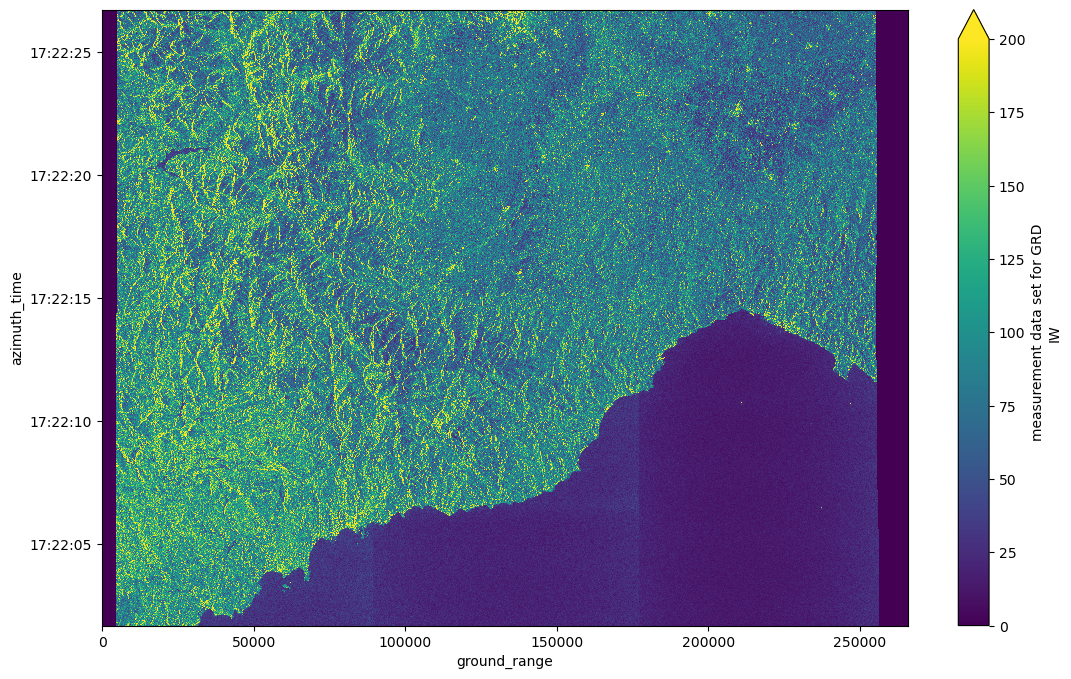
Open Sentinel-1 GRD VH group in native mode as Dataset
Similarily, we can open the individual polarisation bands (assets "vh" and "vv") to open the individual groups as an xarray.Dataset as shown below:
%%time
ds = xr.open_dataset(
    item.assets["vh"].href,
    **item.assets["vh"].extra_fields["xarray:open_dataset_kwargs"],
)
ds
CPU times: user 30.4 ms, sys: 4.05 ms, total: 34.4 ms
Wall time: 314 ms
Open Sentinel-1 GRD as Dataset
The xarray.DataTree model was introduced in xarray v2024.10.0 (October 2024). To maintain compatibility with workflows based on xr.Dataset, the function xarray.open_dataset(..., engine="eopf-zarr", op_mode="native") is provided, which flattens the DataTree into a single dataset.
During this process, hierarchical groups in the Zarr product are merged, and variable as well as dimension names are prefixed with their group paths (using _ by default) to ensure uniqueness. For example, S01SIWGRD_20260316T045550_0025_A364_7C56_080022_VH.measurements becomes S01SIWGRD_20260316T045550_0025_A364_7C56_080022_VH_measurements.
%%time
ds = xr.open_dataset(
    item.assets["product"].href,
    engine="eopf-zarr",
    op_mode="native",
    chunks={},
)
ds
CPU times: user 209 ms, sys: 15.8 ms, total: 225 ms
Wall time: 2.25 s
The separator character used in flattened variable names can be customized via the group_sep parameter. Additionally, you can filter the returned variables using the variables keyword argument, which accepts a string, an iterable of names, or a regular expression (regex) pattern.
In this example, we use a regex to select all arrays associated with the VH band.
ds = xr.open_dataset(
    item.assets["product"].href,
    engine="eopf-zarr",
    op_mode="native",
    chunks={},
    group_sep="/",
    variables="^VH.*",
)
dsWe can now plot the GRD array and the coarse 2d latitude and longitude grids, which can be used for geolocation.
fig, ax = plt.subplots(1, 3, figsize=(15, 4))
ds["VH/measurements/grd"][::10, ::10].plot.imshow(ax=ax[0], vmax=200)
ds["VH/conditions/gcp/longitude"].plot.imshow(ax=ax[1])
ds["VH/conditions/gcp/latitude"].plot.imshow(ax=ax[2])
plt.tight_layout()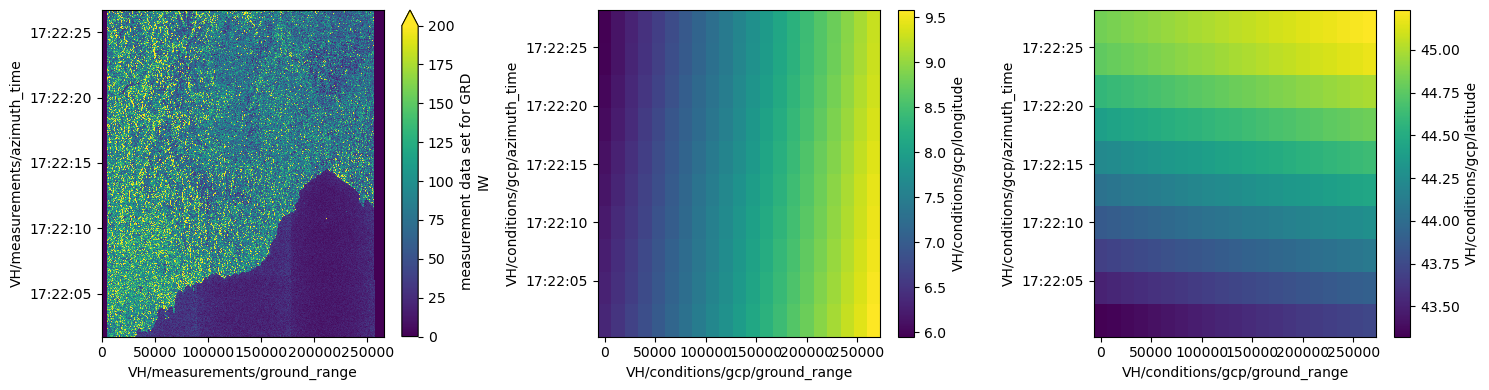
Open a Sentinel-1 Level-1 SLC Product
We now access a Sentinel-1 Level-1 SLC product in native mode. In this mode, each TOPSAR burst is stored as an individual subgroup within the DataTree. The data access methods demonstrated above apply equally to Sentinel-1 Level-1 SLC products.
Find a Sentinel-1 Level-1 SLC Zarr Sample via STAC
To obtain a product URL, you can use the STAC Browser to search for available Sentinel-1 Level-1 SLC tiles.
catalog = pystac_client.Client.open("https://stac.core.eopf.eodc.eu")
items = list(
    catalog.search(
        collections=["sentinel-1-l1-slc"],
        bbox=[7.2, 44.5, 7.4, 44.7],
        datetime=[str(datetime.date.today() - datetime.timedelta(days=180)), None],
    ).items()
)
items
[<Item id=S1D_IW_SLC__1SDV_20260529T173040_20260529T173107_003002_0052AA_15B2>,
<Item id=S1D_IW_SLC__1SDV_20260529T173015_20260529T173042_003002_0052AA_751B>,
<Item id=S1A_IW_SLC__1SDV_20260529T172304_20260529T172331_064735_0827DE_A27C>,
<Item id=S1C_IW_SLC__1SDV_20260528T173030_20260528T173057_007857_00FFA3_6ED6>,
<Item id=S1C_IW_SLC__1SDV_20260528T173005_20260528T173032_007857_00FFA3_D659>,
<Item id=S1D_IW_SLC__1SDV_20260528T054306_20260528T054333_002980_0051E9_B75D>,
<Item id=S1A_IW_SLC__1SDV_20260528T053550_20260528T053617_064713_08271B_56A3>,
<Item id=S1C_IW_SLC__1SDV_20260527T054256_20260527T054323_007835_00FEDC_EA66>,
<Item id=S1D_IW_SLC__1SDV_20260524T172210_20260524T172237_002929_005039_6D3F>,
<Item id=S1C_IW_SLC__1SDV_20260523T172200_20260523T172227_007784_00FD1F_1EAC>,
<Item id=S1D_IW_SLC__1SDV_20260523T053516_20260523T053543_002907_004F80_C4E0>,
<Item id=S1D_IW_SLC__1SDV_20260523T053451_20260523T053518_002907_004F80_67E7>,
<Item id=S1A_IW_SLC__1SDV_20260522T173111_20260522T173138_064633_08244C_AC93>,
<Item id=S1C_IW_SLC__1SDV_20260522T053506_20260522T053533_007762_00FC67_0B08>,
<Item id=S1C_IW_SLC__1SDV_20260522T053442_20260522T053508_007762_00FC67_908D>,
<Item id=S1A_IW_SLC__1SDV_20260521T054413_20260521T054440_064611_082387_4CDB>,
<Item id=S1A_IW_SLC__1SDV_20260521T054348_20260521T054415_064611_082387_E905>,
<Item id=S1D_IW_SLC__1SDV_20260517T173039_20260517T173106_002827_004CD7_2882>,
<Item id=S1D_IW_SLC__1SDV_20260517T173015_20260517T173041_002827_004CD7_8280>,
<Item id=S1A_IW_SLC__1SDV_20260517T172305_20260517T172332_064560_0821BD_160A>,
<Item id=S1C_IW_SLC__1SDV_20260516T173029_20260516T173056_007682_00F9CB_A7F9>,
<Item id=S1C_IW_SLC__1SDV_20260516T173005_20260516T173032_007682_00F9CB_945F>,
<Item id=S1D_IW_SLC__1SDV_20260516T054305_20260516T054332_002805_004C18_37AB>,
<Item id=S1A_IW_SLC__1SDV_20260516T053550_20260516T053617_064538_0820FD_4F3F>,
<Item id=S1C_IW_SLC__1SDV_20260515T054256_20260515T054322_007660_00F905_ECF6>,
<Item id=S1D_IW_SLC__1SDV_20260512T172209_20260512T172236_002754_004A63_C0BD>,
<Item id=S1C_IW_SLC__1SDV_20260511T172159_20260511T172226_007609_00F744_099B>,
<Item id=S1D_IW_SLC__1SDV_20260511T053515_20260511T053542_002732_0049A7_9F0C>,
<Item id=S1D_IW_SLC__1SDV_20260511T053451_20260511T053518_002732_0049A7_B5B8>,
<Item id=S1A_IW_SLC__1SDV_20260510T173111_20260510T173138_064458_081E36_1B26>,
<Item id=S1A_IW_SLC__1SDV_20260509T054413_20260509T054440_064436_081D74_D327>,
<Item id=S1A_IW_SLC__1SDV_20260509T054348_20260509T054415_064436_081D74_BA6C>,
<Item id=S1D_IW_SLC__1SDV_20260505T173038_20260505T173105_002652_0046F9_0EF9>,
<Item id=S1D_IW_SLC__1SDV_20260505T173014_20260505T173040_002652_0046F9_B779>,
<Item id=S1A_IW_SLC__1SDV_20260505T172305_20260505T172332_064385_081B91_DCFD>,
<Item id=S1C_IW_SLC__1SDV_20260504T173029_20260504T173056_007507_00F3E1_8C0B>,
<Item id=S1C_IW_SLC__1SDV_20260504T173004_20260504T173031_007507_00F3E1_BF10>,
<Item id=S1D_IW_SLC__1SDV_20260504T054305_20260504T054332_002630_00463B_0C51>,
<Item id=S1A_IW_SLC__1SDV_20260504T053551_20260504T053618_064363_081AC8_CB1F>]item = items[0]
itemOpen Sentinel-1 Level-1 SLC as DataTree
We can use the "product" asset to obtain the href and xarray:open_datatree_kwargs from the STAC item, and open the product as an xarray.DataTree as shown below:
Note: Due to the large number of subgroups, the resulting DataTree can become very large, which increases the time required for opening the dataset.
%%time
dt = xr.open_datatree(
    item.assets["product"].href,
    **item.assets["product"].extra_fields["xarray:open_datatree_kwargs"],
)
dt
CPU times: user 7.05 s, sys: 293 ms, total: 7.34 s
Wall time: 1min 9s
We can extract one burst as shown below:
child = next(iter(dt.children))
ds = dt[child].measurements.to_dataset()
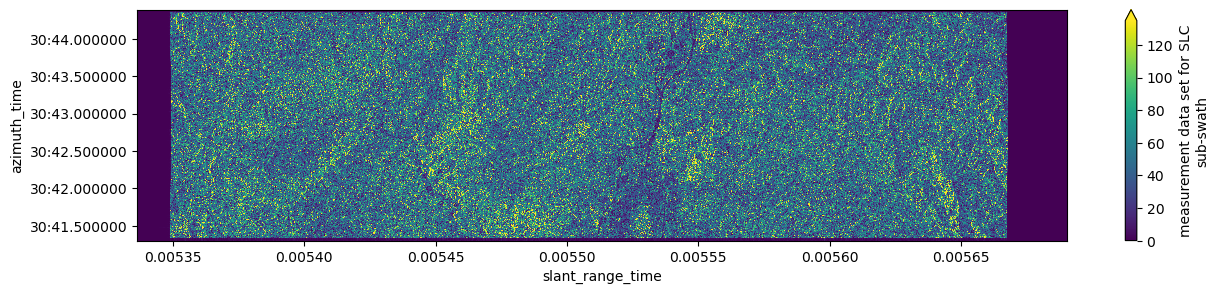
dsAs an example, we plot the amplitude of one burst.
%%time
abs(ds.slc[:, ::20]).plot(robust=True, figsize=(15, 3))
CPU times: user 989 ms, sys: 265 ms, total: 1.25 s
Wall time: 6.75 s
Open a Sentinel-1 Level-2 OCN
We now access a Sentinel-1 Level-2 OCN product in native mode. The data access methods shown above apply equally to Sentinel-1 Level-2 OCN products.
Find a Sentinel-1 Level-2 OCN Zarr Sample via STAC
To obtain a product URL, you can use the STAC Browser to search for available Sentinel-1 Level-2 OCN tiles.
catalog = pystac_client.Client.open("https://stac.core.eopf.eodc.eu")
items = list(
    catalog.search(
        collections=["sentinel-1-l2-ocn"],
        bbox=[7.2, 44.5, 7.4, 44.7],
        datetime=[str(datetime.date.today() - datetime.timedelta(days=365)), None],
    ).items()
)
items
[<Item id=S1C_IW_OCN__2SDV_20250727T172200_20250727T172225_003409_006DAD_7517>,
<Item id=S1C_IW_OCN__2SDV_20250726T053506_20250726T053531_003387_006D07_5CDB>,
<Item id=S1A_IW_OCN__2SDV_20250725T054423_20250725T054448_060236_077C52_B0C4>]item = items[0]
itemOpen Sentinel-1 Level-2 OCN as DataTree
We can use the "product" asset to obtain the href and xarray:open_datatree_kwargs from the STAC item, and open the product as an xarray.DataTree as shown below:
%%time
dt = xr.open_datatree(
    item.assets["product"].href,
    **item.assets["product"].extra_fields["xarray:open_datatree_kwargs"],
)
dt
CPU times: user 123 ms, sys: 2.56 ms, total: 125 ms
Wall time: 514 ms
We can extract the ocean wind field dataset as shown below:
ds = dt[dt.owi.groups[1]].measurements.to_dataset()
dsAs an example, we plot the two ocean wind field array.
fig, ax = plt.subplots(1, 2, figsize=(12, 5))
ds.wind_direction.plot(ax=ax[0])
ds.wind_speed.plot(ax=ax[1])
plt.tight_layout()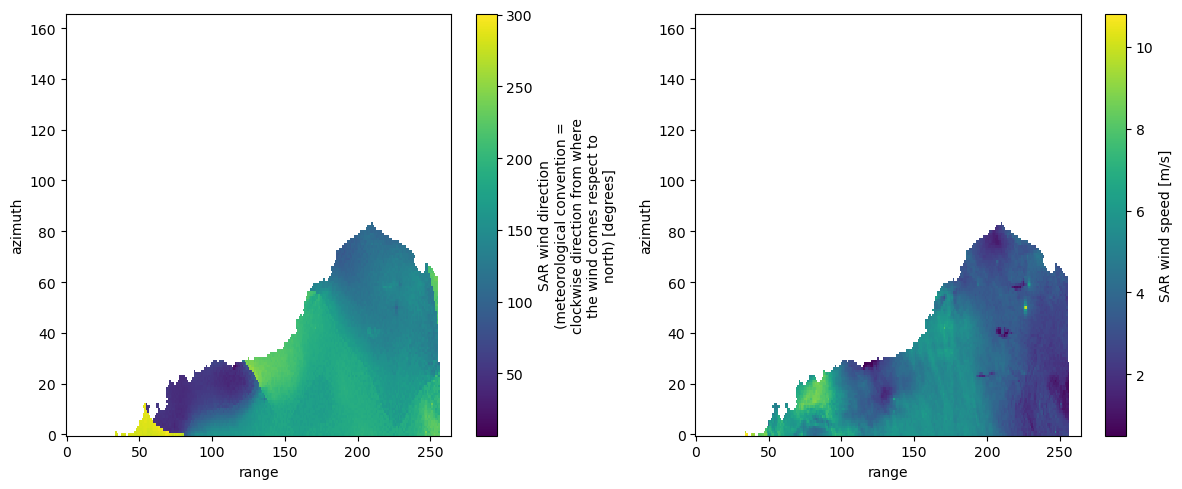
Open Sentinel-1 Level-2 OCN OWI Group as Dataset
We can access the individual sub-groups directly by using the assets "osw", "owi", and "rvl". The opening parameters are stored in the asset’s extra field "xarray:open_dataset_kwargs".
ds = xr.open_dataset(
    item.assets["owi"].href,
    **item.assets["owi"].extra_fields["xarray:open_dataset_kwargs"],
)
dsConclusion
This notebook demonstrates how to access Sentinel-1 EOPF Zarr samples in native mode using the xarray-eopf plugin. Key takeaways are:
Access Sentinel-1 Level-1 GRD, Level-1 SLC, and Level-2 OCN products.
Open the full Zarr store as an
xr.DataTreeusingxr.open_datatreeand the asset"product".Open subgroups (e.g.,
"vh","vv","owi", and"rvl") asxr.Datasetusingxr.open_dataset.Open the full Zarr store as a flattened
xr.Datasetusingxr.open_datasetand the asset"product".Filter variables using the
variableskeyword argument.
Note:
This notebook only covers the native mode, which presents the data as close as possible to the original product.
For an analysis-ready view, see the Sentinel-1 analysis mode notebook.
